此功能基于vue(v2.6.8) + typescript(v3.3.3333), 引入极验(geetest v3+)(官方api),使用其product: 'bind'模式, 页面挂载后初始化ininGeetest,点击登录按钮后先做表单验证,通过后弹出滑块框,拖动验证成功,执行登录方法。
本项目为前后端分离,所以后端部署部分,请自行参考文档操作
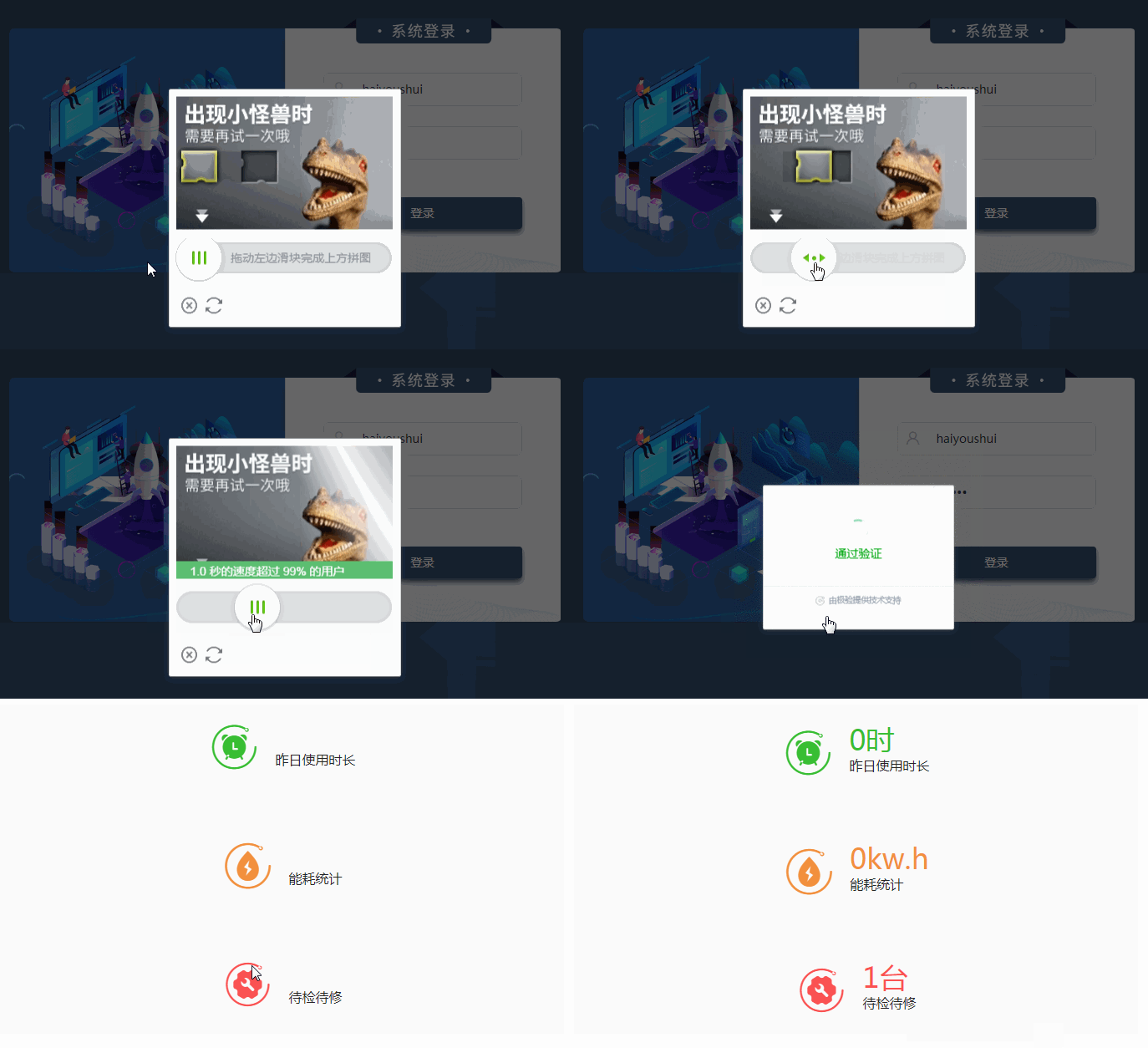
后台接口:
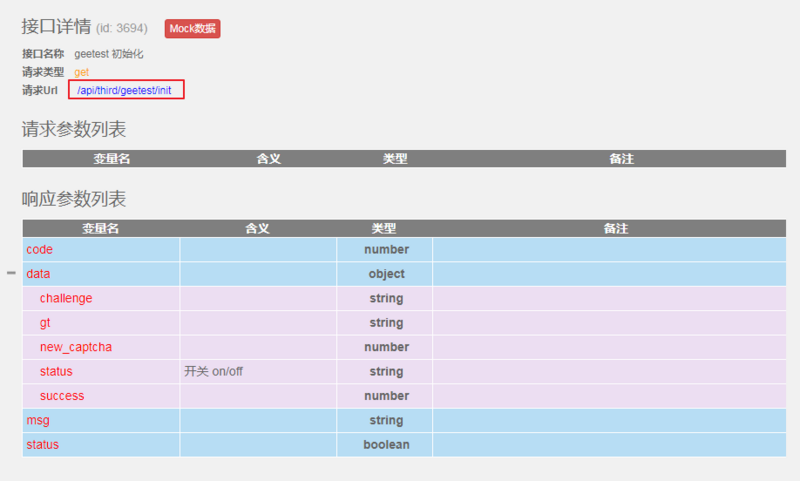
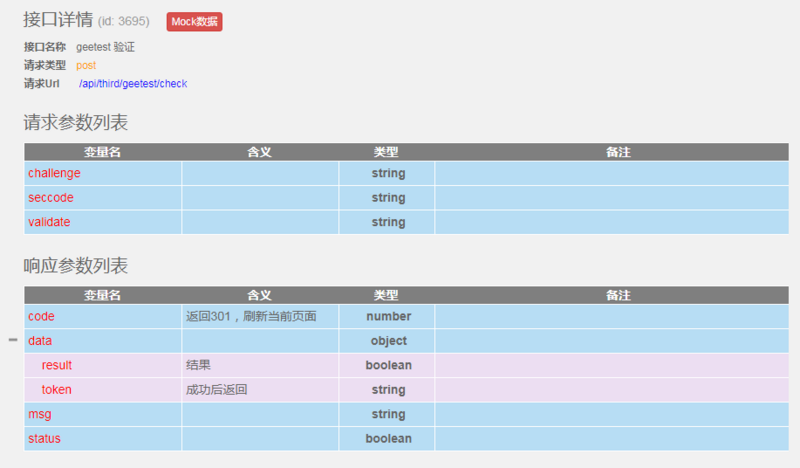
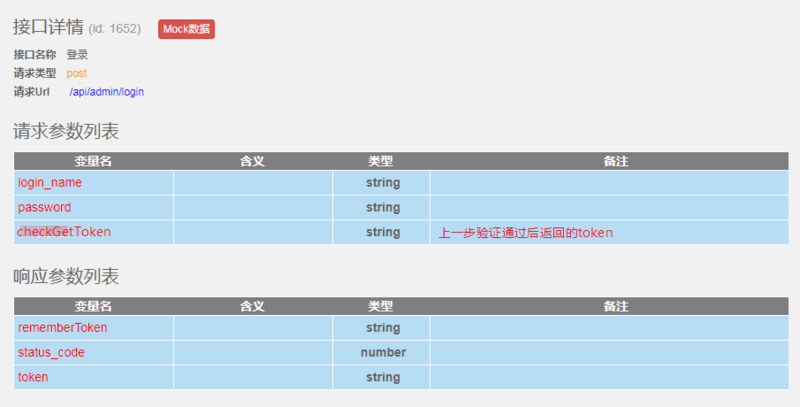
开始:/public/js目录添加 jquery-1.12.3.min.js文件 和 gt.js(下载)在/public/index.html中引入以上添加的两个文件login.vue使用注意事项:要注意在gt.js中,initGeetest已被挂载到window对象

页面可能报错: Uncaught SyntaxError: Unexpected token <

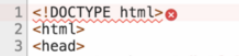
将报错对象添加到与public同级的static目录下(没有则新建),修改引入路径即可。
源码:
<script lang="ts">
import { isValidUsername } from '@/utils/validate';
import { Component, Vue, Watch } from 'vue-property-decorator';
import { Route } from 'vue-router';
import { ElForm } from 'element-ui/types/form';
import { Loading } from 'element-ui';

import { Action } from 'vuex-class';
import AuthServices from '@/services/user/auth.ts';
import ThirdpartyServices from '@/services/thirdparty/index.ts';

const validateUsername = (rule: any, value: string, callback: any) => {
 if (! value) {
 callback(new Error('用户名不能为空'));
 // } else if (!isValidUsername(value)) {
 // callback(new Error('请输入正确的用户名'));
 } else {
 callback();
 }
};
const validatePass = (rule: any, value: string, callback: any) => {
 if (! value) {
 callback(new Error('密码不能为空'));
 // } else if (value.length < 5) {
 // callback(new Error('密码不能小于5位'));
 } else {
 callback();
 }
};

@Component({
 name: 'login',
})
export default class Login extends Vue {
 @Action('auth/login') private login_action!: CCS.LoginAction;

 private loginForm = { username: '', password: '' };
 private loginRules = {
 username: [{trigger: 'blur', validator: validateUsername }],
 password: [{trigger: 'blur', validator: validatePass }],
 };
 private loading = false;
 private redirect: string | undefined = undefined;
 private captchaEntity: any;
 // private loadingInstance: any;

 @Watch('$route', { immediate: true }) private OnRouteChange(route: Route) {
 this.redirect = route.query && route.query.redirect as string;
 }

 // private created() {
 // this.loadingInstance = Loading.service({
 // customClass: 'login_loading',
 // text: '正在初始化,请稍后',
 // fullscreen: true,
 // lock: true,
 // });
 // }

 /** ==================== 验证 START ========================= */
 /**
 * 页面挂载后,后台获取初始化initGeetest所需参数值
 */
 private async mounted() {
 ThirdpartyServices.geetest_init().then((result) => {
 // this.loadingInstance.close();
 if (result.status) {
 this.initGeetest(result.data);
 } else {
 this.$message({ type: 'error', message: result.message });
 }
 });
 }
 /**
 * initGeetest 初始化
 */
 private initGeetest(param: CCS.GeettestInitType) {
 if ( ! (window as any) || ! (window as any).initGeetest ) {
 return false;
 }
 (window as any).initGeetest({
 gt: param.gt,
 challenge: param.challenge,
 offline: ! param.success,
 new_captcha: param.newcaptcha,
 timeout: '5000',
 product: 'bind',
 width: '300px',
 https: true,

 }, this.captchaObj_callback);
 }
 /**
 * 初始化后的回调函数
 */
 private async captchaObj_callback(captchaObj: any) {
 this.captchaEntity = captchaObj; // promise对象
 captchaObj
 .onReady(() => { // 验证码就位
 })
 .onSuccess(() => {
 const rst = captchaObj.getValidate();
 if (!rst) {
 this.$message({ type: 'warning', message: '请完成验证'});
 }

 // 调用后台check this.captchaObj
 this.verify_check(rst);
 })
 .onError((err: Error) => {
 console.log(err);
 });
 }
 /**
 * 后台验证初始化结果
 */
 private async verify_check(validateResult: any) {
 ThirdpartyServices.geetest_checked(validateResult.geetest_challenge, validateResult.geetest_validate, validateResult.geetest_seccode ).then((result) => {
 if (result.status && result.data.result) {
 // 验证通过,发送登录请求
 this.handleLogin(result.data.token);
 } else {
 this.$message({ type: 'error', message: '验证失败'});
 return false;
 }
 });
 }
 /** ==================== 验证 END ========================= */
 /**
 * 点击登录按钮,弹出验证框
 */
 private login_btn_click() {
 (this.$refs.refform as ElForm).validate((valid) => {
 if (valid) {
 this.captchaEntity.verify(); // 显示验证码
 }
 });
 }
 /**
 * 验证成功,发送登录请求
 */
 private async handleLogin(token: string) {
 this.loading = true;
 const { status, message} = await this.login_action({username: this.loginForm.username.trim(), password: this.loginForm.password, token});

 this.loading = false;
 if (status) {
 this.$message({type: 'success', message: '登录成功'});
 this.$router.push({ path: this.redirect || '/' });
 } else {
 this.$message({type: 'error', message});
 }
 }
}
</script>

<template>
 <div class="login-container">
 <div class="login_form_wraper">
 <div class="logo_show">
 <img :src="require('@/assets/images/logo_w328.png')">
 </div>
 <img class="form_bg" :src="require('@/assets/images/login_form.png')">
 <el-form ref="refform" class="login-form" auto-complete="on" label-position="left"
 :model="loginForm" :rules="loginRules">
 <el-form-item prop="username">
 <el-input v-model="loginForm.username" name="username" type="text" auto-complete="on" placeholder="用户名"/>
 <i class="iconfont icon-zhanghaodenglu icon_prefix"></i>
 </el-form-item>
 <el-form-item prop="password">
 <el-input v-model="loginForm.password" name="password" type="password" auto-complete="on" placeholder="密码"
 @keyup.enter.native="handleLogin" />
 <i class="iconfont icon-mima icon_prefix"></i>
 </el-form-item>

 <el-form-item class="login_btn">
 <el-button v-if="!loading" @click.native.prevent="login_btn_click">登录</el-button>
 <el-button :loading="loading" v-else @click.native.prevent="handleLogin">登录中</el-button>
 </el-form-item>
 </el-form>

 </div>
 </div>
</template>

<style lang="stylus" scoped>
@import '~@/assets/styles/var.styl';
@import '~@/assets/styles/pages/login.styl';

.login-container
 pass

</style>
以上就是本文的全部内容,希望对大家的学习有所帮助,也希望大家多多支持脚本之家。