jquery仿京东商品页面
京东页面大家都很熟悉,进入商品页面把鼠标放在图片上旁边会出现一个放大的效果,接下来就带大家看看怎么实现的!!!!
仿京东商品页面css的代码!!!
*{
 margin: 0;
 padding: 0;
}
.da{
 width: 360px;
 height: 418px;
 float: left;
}
.shang{
 width: 350px;
 height: 350px;
 border: 1px solid #ccc;
 margin: 10px 0 10px 10px;
 position: relative;
}
.yin{
 width: 150px;
 height: 150px;
 border: 1px solid #ccc;
 background: rgba(255,255,255,0.3);
 position: absolute;
 top:0;
 left: 0;
 cursor: pointer;
 display: none;
}
.bao{
 width: 362px;
 height: 56px;
}
.tab{
 width: 320px;
 height: 56px;
 margin-left: 10px;
 overflow: hidden;
}
.Ul{
 width: 9999px;
 height: 56px;
}
.Ul li{
 width: 52px;
 height: 52px;
 float: left;
 border: 2px solid #ccc;
 margin-left: 8px;
 list-style: none;
 position:relative;
 text-align:center;
}
.li{
 width: 52px;
 height: 52px;
 border: 2px solid #FF7403;
}
.li img{
 display: block;
 position: absolute;
 top:50%;
 left: 50%;
 margin-top:-26px;
 margin-left:-26px;
}
.zuo{
 display: block;
 width: 12px;
 height: 56px;
 background: url(../img/icon_clubs.gif) no-repeat;
 background-size: 180px 608px;
 background-position: -82px -462px;
 float: left;
 margin-left: 10px;
}
.you{
 display: block;
 width: 12px;
 height: 56px;
 background: url(../img/icon_clubs.gif) no-repeat;
 background-size: 180px 608px;
 background-position: -95px -462px;
 float: right;
 margin-top: -56px;
}
.xia{
 width: 360px;
 height: 418px;
 border: 1px solid #ccc;
 float: left;
 margin: 10px 0 0px 20px;
 overflow: hidden;
 display: none;
}

.lie{
 width: 1329px;
 height: 30px;
 margin-left: 10px;
 margin-top: 20px;
 border-bottom: 2px solid #BE0000;
}
.lie li{
 float: left;
 list-style: none;
 width: 80px;
 height: 28px;
 background: #fff;
 border-radius: 3px;
 border: 0;
 line-height: 30px;
 text-align: center;
 margin-right: 5px;
 border:1px solid #BE0000;
 color: #c30;
 cursor: pointer;
 font-weight: bold;
}
.lie>ul .ll{
 width: 80px;
 height: 30px;
 background: #BE0000;
 border-radius: 3px;
 border: 0;
 line-height: 30px;
 text-align: center;
 color: #fff;
 cursor: pointer;
}
.nie{
 width: 1329px;
 height: 200px;
 margin-left: 10px;
 overflow: hidden;
}
.bao1{
 width: 1329px;
 height: 500px;
}
.up{
 width: 1329px;
 height: 200px;
}
.up span{
 display: block;
 padding:10px 0 0 10px;
 margin-bottom: 70px;
}
.up p{
 text-align: center;
 margin-top: 5px;
}
.down{
 width: 1329px;
 height: 300px;
 background: yellow;
}
仿京东商品页面html的代码!!!
<div>
 <div class="da ">
 <div class="shang">
 <img src="img/b1.jpg" height="350" width="350" id="pian">
 <div class="yin"></div>
 </div>
 <div class="bao">
 <span class="zuo"></span>

 <div class="tab">
 <ul class="Ul">
 <li>
 <img src="img/b1.jpg" height="52" width="52" />
 </li>
 <li>
 <img src="img/b2.jpg" height="52" width="52" />
 </li>
 <li>
 <img src="img/b3.jpg" height="52" width="52" />
 </li>
 <li>
 <img src="img/b1.jpg" height="52" width="52" />
 </li>
 <li>
 <img src="img/b2.jpg" height="52" width="52" />
 </li>
 <li>
 <img src="img/b3.jpg" height="52" width="52" />
 </li>
 <li>
 <img src="img/b1.jpg" height="52" width="52" />
 </li>
 <li>
 <img src="img/b2.jpg" height="52" width="52" />
 </li>
 </ul>
 </div>
 <span class="you"></span>
 </div>
 <div class="lie ">
 <ul>
 <li class="ll">图文介绍</li>
 <li>评论(1)</li>
 </ul>
 </div>

 <div class="nie">
 <div class="bao1">
 <div class="up">
 <span>暂无好评!</span>
 <p>适用浏览器:IE8、360、FireFox、Chrome、Safari、Opera、傲游、搜狗、世界之窗</p>
 <p>来源:师徒课堂</p>
 </div>
 <div class="down">
 <img src="img/11.png" height="300" width="1329" />
 </div>
 </div>
 </div>
 </div>
 <div class="xia">
 <img src="img/b1.jpg" height="600" width="600" id="zhao" />
 </div>
</div>
仿京东商品页面jquery的代码!!!
$(function(){
 var $yin = $(".yin");
 $(".Ul li img").mouseover(function(){
 $(this).parent().addClass("li").siblings().removeClass("li");
 $("#pian").attr("src",$(this).attr("src"));
 $("#zhao").attr("src",$(this).attr("src"));
 }).mouseout(function(){
 $(this).parent().removeClass("li");
 });

 var l = $(".shang").eq(0).offset().left;
 var t = $(".shang").eq(0).offset().top;
 var width1 = $(".yin").outerWidth()/2;
 var height1 = $(".yin").outerHeight()/2;
 var maxL = $(".shang").width() - $yin.outerWidth();
 var maxT = $(".shang").height() - $yin.outerHeight();
 var bili = $("#zhao").width()/$("#pian").width();

 $(".shang").mousemove(function(e){
 var maskL = e.clientX - l - width1,maskT = e.clientY - t - height1;
 if (maskL < 0) { maskL = 0};
 if (maskT < 0) { maskT = 0};
 if (maskL > maxL) {maskL = maxL};
 if (maskT > maxT) {maskT = maxT};

 $yin.css({"left":maskL,"top":maskT});
 $(".xia").show();
 $(".yin").show();
 $("#zhao").css({"margin-left":-maskL*bili,"margin-top":-maskT*bili});


 });
 $(".shang").mouseleave(function(){
 $(".xia").hide();
 $(".yin").hide();
 });

 var marginLeft = 0;
 $(".you").click(function(){
 marginLeft = marginLeft - 64;
 if (marginLeft < -192) {marginLeft = -192};
 $(".tab ul").stop().animate({"margin-left":marginLeft},"fast");
 });

 $(".zuo").click(function(){
 marginLeft = marginLeft + 64;
 if (marginLeft > 0) {marginLeft = 0};
 $(".tab ul").stop().animate({"margin-left":marginLeft},"fast");
 });

 $(".lie li").click(function(){
 var index=$(this).index();
 $(this).addClass("ll").siblings().removeClass("ll");
 $(".bao1>div").eq(index).show().siblings().hide();
 });
});
仿京东商品页面的效果!!!
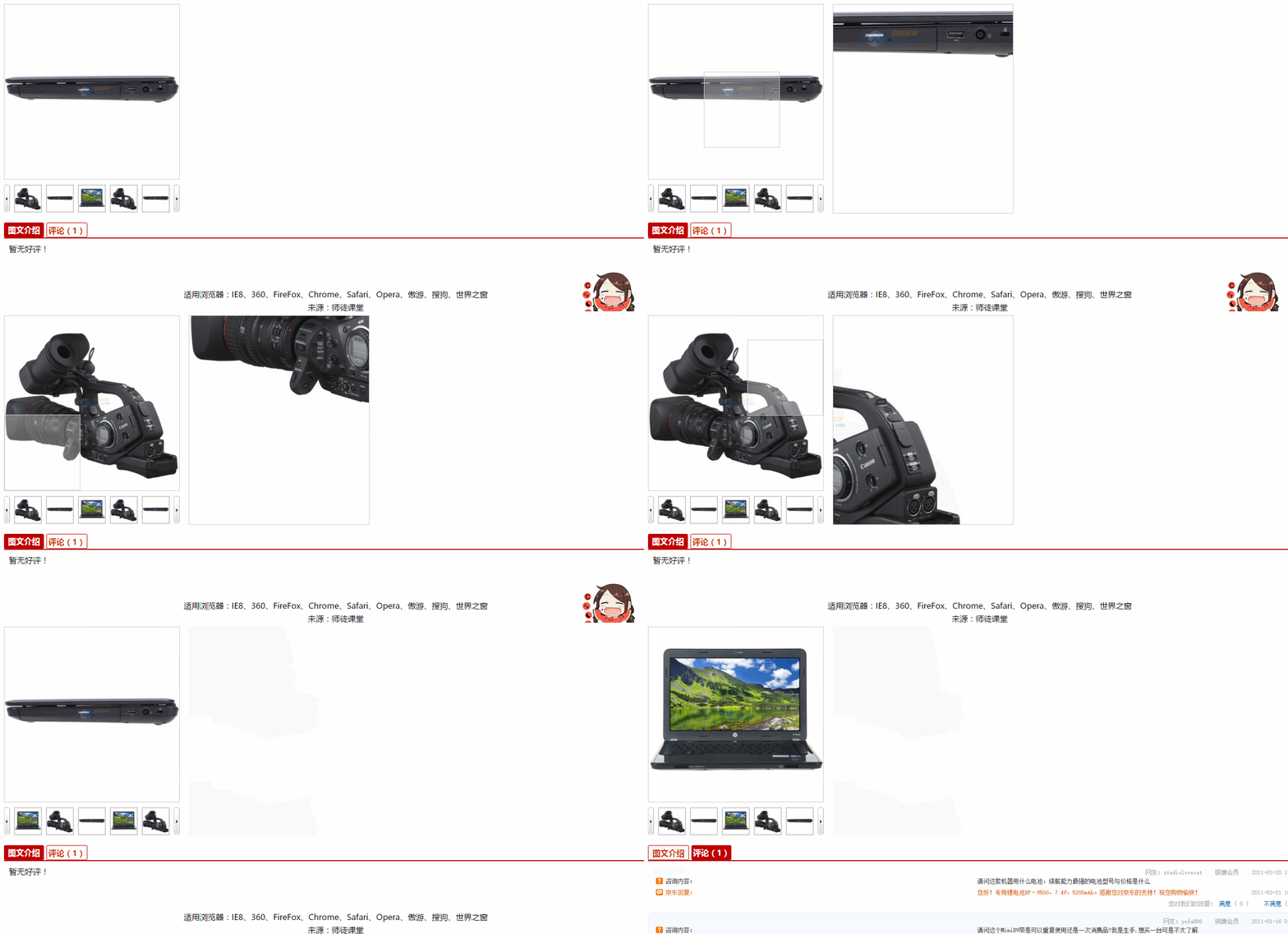
怎么样,当我做出来的时候感觉神清气爽!!!!!
以上就是本文的全部内容,希望对大家的学习有所帮助,也希望大家多多支持脚本之家。