一,准备工作
1.下载node.js 和 npm
2.将镜像源替换为淘宝镜像
二,创建项目
1.vue环境搭建
创建目录resume 1)npm init -y 2)npm install vue-cli -g (安装vue-cli ) 3)vue init webpack --dirname(为空时默认当前目录)
输入命令后,会询问我们几个简单的选项,我们根据自己的需要进行填写就可以了。
- Project name :项目名称 ,如果不需要更改直接回车就可以了。注意:这里不能使用大写,所以我把名称改成了vueclitest
- Project description:项目描述,默认为A Vue.js project,直接回车,不用编写。
- Author:作者,如果你有配置git的作者,他会读取。
- Install vue-router? 是否安装vue的路由插件,我们这里需要安装,所以选择Y
- Use ESLint to lint your code? 是否用ESLint来限制你的代码错误和风格。我们这里不需要输入n,如果你是大型团队开发,最好是进行配置。
- setup unit tests with Karma + Mocha? 是否需要安装单元测试工具Karma+Mocha,我们这里不需要,所以输入n。
- Setup e2e tests with Nightwatch?是否安装e2e来进行用户行为模拟测试,不需要,所以输入n。
等待安装完毕后,文件目录结构如下
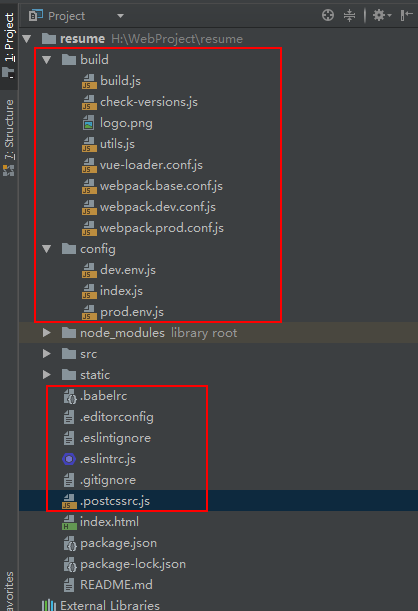
此时已经搭建好了vue的开发环境。
打开package.json我们可以看到官方脚手架提供的4个脚本

我们直接在命令行输入npm run star,即可看到vue提供的demo。
三,脚手架解析
当我们键入npm run start时,其实执行的是build目录下的webpack.dev.conf.js。
webpack.dev.conf.js
'use strict'

/*工具类 主要提供以下几个方法
 * assetsPath 获取静态资源路径
 * exports.cssLoaders 返回针对各类型的样式文件的处理方式
 * exports.styleLoaders 返回webpack需要的css相关的loader的配置,它也使用了cssLoaders()
 * exports.createNotifierCallback node-notifier'是一个跨平台系统通知的页面。
 * 当遇到错误时,它能用系统原生的推送方式给你推送信息这个方法用于推送错误信息
 * 跳转至utils
 */
const utils = require('./utils')

//引入webpack模块
const webpack = require('webpack')

/*引入配置文件 他下面有3个文件
 * dev.env.js 导出开发环境的名称
 * prod.env.js 到处生产环境的名称
 * index.js 到处不同环境需要的具体配置
 * 跳转至config
 */
const config = require('../config')

//webpack-merge这个包,这个包的作用是来合并两个配置文件对象并生成一个新的配置文件,有点儿类似于es6的Object.assign()方法。合并冲突时,第二个参数的属性值会覆盖第一个参数的属性值。
const merge = require('webpack-merge')

//处理文件路径的模块
const path = require('path')

/* 配置webpack编译入口
 * 配置webpack输出路径和命名规则
 * 配置模块resolve规则
 * 配置不同类型模块的处理规则
 * 跳转至webpack.base.conf
 */
const baseWebpackConfig = require('./webpack.base.conf')

//一个负责拷贝资源的插件
const CopyWebpackPlugin = require('copy-webpack-plugin')

// 一个用于生成HTML文件并自动注入依赖文件(link/script)的webpack插件
const HtmlWebpackPlugin = require('html-webpack-plugin')

//一个更友好的展示webpack错误提示的插件
const FriendlyErrorsPlugin = require('friendly-errors-webpack-plugin')

//一个自动检索端口的包
const portfinder = require('portfinder')

//当前环境HOST
const HOST = process.env.HOST

//当前环境端口
const PORT = process.env.PORT && Number(process.env.PORT)

//baseWebpackConfig请跳到./webpack.base.conf小节
const devWebpackConfig = merge(baseWebpackConfig, {
 module: {
 //此处的配置会覆盖掉baseWebpackConfig的 sourceMap是否开启,是否使用postcss
 //postcssloader 为CSS3自动加上浏览器前缀
 rules: utils.styleLoaders({ sourceMap: config.dev.cssSourceMap, usePostCSS: true })
 },
 // cheap-module-eval-source-map在开发环境中最快
 devtool: config.dev.devtool,

 // devServer的配置大家看文档就好了 配置太大不一一赘述了
 devServer: {
 clientLogLevel: 'warning',
 historyApiFallback: {
 rewrites: [
 { from: /.*/, to: path.posix.join(config.dev.assetsPublicPath, 'index.html') },
 ],
 },
 hot: true,
 contentBase: false, // since we use CopyWebpackPlugin.
 compress: true,
 host: HOST || config.dev.host,
 port: PORT || config.dev.port,
 open: config.dev.autoOpenBrowser,
 overlay: config.dev.errorOverlay
 ? { warnings: false, errors: true }
 : false,
 publicPath: config.dev.assetsPublicPath,
 proxy: config.dev.proxyTable,
 quiet: true, // necessary for FriendlyErrorsPlugin
 watchOptions: {
 poll: config.dev.poll,
 }
 },
 //插件
 plugins: [
 //配置开发环境
 new webpack.DefinePlugin({
 'process.env': require('../config/dev.env')
 }),
 //模块热替换的插件,修改模块不需要刷新页面
 new webpack.HotModuleReplacementPlugin(),
 //当使用HotModuleReplacementPlugin时,这个插件会显示模块正确的相对路径
 new webpack.NamedModulesPlugin(),
 //在编译出错时,使用NoEmitOnErrorsPlugin来跳过输出阶段,这样可以确保输出资源不会包含错误
 new webpack.NoEmitOnErrorsPlugin(),

 //这里将resume/index.html作为模版,生成一份新的index.html在build下。
 // https://github.com/ampedandwired/html-webpack-plugin
 new HtmlWebpackPlugin({
 filename: 'index.html',
 template: 'index.html',
 inject: true
 }),
 // 复制静态资源
 new CopyWebpackPlugin([
 {
 from: path.resolve(__dirname, '../static'),
 to: config.dev.assetsSubDirectory,
 ignore: ['.*']
 }
 ])
 ]
})

//这里主要是做端口的检索以及npm run dev后对错误的处理
module.exports = new Promise((resolve, reject) => {
 portfinder.basePort = process.env.PORT || config.dev.port
 portfinder.getPort((err, port) => {
 if (err) {
 reject(err)
 } else {
 // publish the new Port, necessary for e2e tests
 process.env.PORT = port
 // add port to devServer config
 devWebpackConfig.devServer.port = port

 // Add FriendlyErrorsPlugin
 devWebpackConfig.plugins.push(new FriendlyErrorsPlugin({
 compilationSuccessInfo: {
 messages: [`Your application is running here: http://${devWebpackConfig.devServer.host}:${port}`],
 },
 onErrors: config.dev.notifyOnErrors
 ? utils.createNotifierCallback()
 : undefined
 }))

 resolve(devWebpackConfig)
 }
 })
})
utils.js
'use strict'
const path = require('path')
//跳转至config
const config = require('../config')

//这个plugin的作用是将打包后生成的css文件通过link的方式引入到html中,如果不适用这个插件css代码会放到head标签的style中
const ExtractTextPlugin = require('extract-text-webpack-plugin')
const packageConfig = require('../package.json')

//process.env.NODE_ENV是一个环境变量,它是由webpack.dev/prod.conf.js这两个文件声明的;
//这里的意思是判断当前是否是开发环境,如果是就把config下index.js文件中build.assetsSubDirectory或
//dev.assetsSubDirectory的值赋给assetsSubDirectory
exports.assetsPath = function (_path) {
 const assetsSubDirectory = process.env.NODE_ENV === 'production'
 ? config.build.assetsSubDirectory
 : config.dev.assetsSubDirectory

 return path.posix.join(assetsSubDirectory, _path)
}

//cssLoaders的作用是导出一个供vue-loader的options使用的一个配置;
exports.cssLoaders = function (options) {
 options = options || {}

 const cssLoader = {
 loader: 'css-loader',
 options: {
 sourceMap: options.sourceMap
 }
 }

 const postcssLoader = {
 loader: 'postcss-loader',
 options: {
 sourceMap: options.sourceMap
 }
 }

 // generate loader string to be used with extract text plugin
 function generateLoaders (loader, loaderOptions) {
 const loaders = options.usePostCSS ? [cssLoader, postcssLoader] : [cssLoader]

 if (loader) {
 loaders.push({
 loader: loader + '-loader',
 options: Object.assign({}, loaderOptions, {
 sourceMap: options.sourceMap
 })
 })
 }

 // Extract CSS when that option is specified
 // (which is the case during production build)
 if (options.extract) {
 return ExtractTextPlugin.extract({
 use: loaders,
 fallback: 'vue-style-loader'
 })
 } else {
 return ['vue-style-loader'].concat(loaders)
 }
 }

 // https://vue-loader.vuejs.org/en/configurations/extract-css.html
 return {
 css: generateLoaders(),
 postcss: generateLoaders(),
 less: generateLoaders('less'),
 sass: generateLoaders('sass', { indentedSyntax: true }),
 scss: generateLoaders('sass'),
 stylus: generateLoaders('stylus'),
 styl: generateLoaders('stylus')
 }
}

//用来给webpack提供和css相关的loader的配置,它使用了cssLoaders方法;
exports.styleLoaders = function (options) {
 const output = []
 const loaders = exports.cssLoaders(options)

 for (const extension in loaders) {
 const loader = loaders[extension]
 output.push({
 test: new RegExp('\\.' + extension + '$'),
 use: loader
 })
 }

 return output
}
//当遇到错误时,给你推送信息
exports.createNotifierCallback = () => {
 const notifier = require('node-notifier')

 return (severity, errors) => {
 if (severity !== 'error') return

 const error = errors[0]
 const filename = error.file && error.file.split('!').pop()

 notifier.notify({
 title: packageConfig.name,
 message: severity + ': ' + error.name,
 subtitle: filename || '',
 icon: path.join(__dirname, 'logo.png')
 })
 }
}
webpack.base.conf.js
'use strict'
const path = require('path')
//跳转至utils
const utils = require('./utils')
//跳转至config
const config = require('../config')
//vue-load 处理.vue 结尾的文件
//跳转至vue-loader.conf
const vueLoaderConfig = require('./vue-loader.conf')

//resolve这个函数返回的是当前目录下"../dir"这个文件夹,__dirname指的是当前文件所在路径
function resolve (dir) {
 return path.join(__dirname, '..', dir)
}

//创建eslint规则
const createLintingRule = () => ({
 test: /\.(js|vue)$/,
 loader: 'eslint-loader',
 enforce: 'pre',
 include: [resolve('src'), resolve('test')],
 options: {
 formatter: require('eslint-friendly-formatter'),
 emitWarning: !config.dev.showEslintErrorsInOverlay
 }
})

module.exports = {
 //基础目录,绝对路径,用于从配置中解析入口起点(entry point)和加载器(loader)
 context: path.resolve(__dirname, '../'),

 //入口 webpack 应该使用哪个模块 可以是数组
 entry: {
 app: './src/main.js'
 },

 //webpack 在哪里输出它所创建的 bundles,以及如何命名这些文件
 output: {
 //导出目录,绝对路径
 path: config.build.assetsRoot,
 //输出文件的名称
 filename: '[name].js',
 //打包后浏览器访问服务时的 url 路径,可用于改资源请求路径
 publicPath: process.env.NODE_ENV === 'production'
 ? config.build.assetsPublicPath
 : config.dev.assetsPublicPath
 },
 //主要设置模块如何被解析。
 resolve: {
 //自动解析确定的拓展名,使导入模块时不带拓展名 例如映入./build/Test 不需要.js结尾
 extensions: ['.js', '.vue', '.json'],
 //常用模块别名
 //import vue = import resume/node_modules/vue/dist/vue.esm.js
 alias: {
 'vue$': 'vue/dist/vue.esm.js',
 '@': resolve('src'),
 }
 },
 //模块
 module: {
 //指定模块解析规则
 rules: [
 //ES6新加入和扩展运算符
 ...(config.dev.useEslint ? [createLintingRule()] : []),
 {
 test: /\.vue$/,
 loader: 'vue-loader',
 options: vueLoaderConfig
 },
 {
 test: /\.js$/,
 loader: 'babel-loader',
 include: [resolve('src'), resolve('test'), resolve('node_modules/webpack-dev-server/client')]
 },
 {
 test: /\.(png|jpe?g|gif|svg)(\?.*)?$/,
 loader: 'url-loader',
 options: {
 limit: 10000,
 name: utils.assetsPath('img/[name].[hash:7].[ext]')
 }
 },
 {
 test: /\.(mp4|webm|ogg|mp3|wav|flac|aac)(\?.*)?$/,
 loader: 'url-loader',
 options: {
 limit: 10000,
 name: utils.assetsPath('media/[name].[hash:7].[ext]')
 }
 },
 {
 test: /\.(woff2?|eot|ttf|otf)(\?.*)?$/,
 loader: 'url-loader',
 options: {
 limit: 10000,
 name: utils.assetsPath('fonts/[name].[hash:7].[ext]')
 }
 }
 ]
 },
 //以下选项是Node.js全局变量或模块,这里主要是防止webpack注入一些Node.js的东西到vue中
 node: {
 setImmediate: false,
 dgram: 'empty',
 fs: 'empty',
 net: 'empty',
 tls: 'empty',
 child_process: 'empty'
 }
}
vue-loader.conf.js
'use strict'
//跳转至utils
const utils = require('./utils')
//跳转至config
const config = require('../config')
//开发环境生产环境标识
const isProduction = process.env.NODE_ENV === 'production'

//不同环境为sourceMapEnabled 赋值: 这里都为true
const sourceMapEnabled = isProduction
 ? config.build.productionSourceMap
 : config.dev.cssSourceMap

//导出vue-loader的配置,这里我们用了utils文件中的cssLoaders();
module.exports = {
 //vue-loader 处理.vue文件 将vue文件转换为JS模块 其中定义了其他loader,对< style >< template >中的静态资源当做模块来对待,并且使用webpack loaders进行处理
 loaders: utils.cssLoaders({
 sourceMap: sourceMapEnabled,
 extract: isProduction
 }),
 //是否开启cssSourceMap,Source map就是一个信息文件,主要用于开发环境的调试,里面储存着位置信息。也就是说,转换后的代码的每一个位置,所对应的转换前的位置。
 cssSourceMap: sourceMapEnabled,
 //一个配合devtool的配置,当给文件名插入新的hash导致清楚缓存时是否生成souce maps,默认在开发环境下为true
 cacheBusting: config.dev.cacheBusting,

 //transformToRequire的作用是在模板编译的过程中,编译器可以将某些属性,如src转换为require调用;
 //配置这个之后就不需要在使用src时使用require
 transformToRequire: {
 video: ['src', 'poster'],
 source: 'src',
 img: 'src',
 image: 'xlink:href'
 }
}
config/index.js 这里的英文解释比较全,直接粘贴了官方提供的
'use strict'
// Template version: 1.3.1
// see http://vuejs-templates.github.io/webpack for documentation.

const path = require('path')

module.exports = {
 dev: {

 // Paths
 assetsSubDirectory: 'static',
 assetsPublicPath: '/',
 proxyTable: {},

 // Various Dev Server settings
 host: 'localhost', // can be overwritten by process.env.HOST
 port: 8080, // can be overwritten by process.env.PORT, if port is in use, a free one will be determined
 autoOpenBrowser: false,
 errorOverlay: true,
 notifyOnErrors: true,
 poll: false, // https://webpack.js.org/configuration/dev-server/#devserver-watchoptions-

 // Use Eslint Loader?
 // If true, your code will be linted during bundling and
 // linting errors and warnings will be shown in the console.
 useEslint: true,
 // If true, eslint errors and warnings will also be shown in the error overlay
 // in the browser.
 showEslintErrorsInOverlay: false,

 /**
 * Source Maps
 */

 // https://webpack.js.org/configuration/devtool/#development
 devtool: 'cheap-module-eval-source-map',

 // If you have problems debugging vue-files in devtools,
 // set this to false - it *may* help
 // https://vue-loader.vuejs.org/en/options.html#cachebusting
 cacheBusting: true,

 cssSourceMap: true
 },

 build: {
 // Template for index.html
 index: path.resolve(__dirname, '../dist/index.html'),

 // Paths
 assetsRoot: path.resolve(__dirname, '../dist'),
 assetsSubDirectory: 'static',
 assetsPublicPath: '/',

 /**
 * Source Maps
 */

 productionSourceMap: true,
 // https://webpack.js.org/configuration/devtool/#production
 devtool: '#source-map',

 // Gzip off by default as many popular static hosts such as
 // Surge or Netlify already gzip all static assets for you.
 // Before setting to `true`, make sure to:
 // npm install --save-dev compression-webpack-plugin
 productionGzip: false,
 productionGzipExtensions: ['js', 'css'],

 // Run the build command with an extra argument to
 // View the bundle analyzer report after build finishes:
 // `npm run build --report`
 // Set to `true` or `false` to always turn it on or off
 bundleAnalyzerReport: process.env.npm_config_report
 }
}
config/prod.env.js
'use strict'
module.exports = {
 NODE_ENV: '"production"'
}
config/dev.env.js
'use strict'
const merge = require('webpack-merge')
const prodEnv = require('./prod.env')
//使用webpack-merge来进行合并,减少重复代码。
module.exports = merge(prodEnv, {
 NODE_ENV: '"development"'
})
当我们键入npm run build时,其实执行的是build目录下的build.js。
build.js
'use strict'
//跳转至check-versions
require('./check-versions')()
//指定为生成环境
process.env.NODE_ENV = 'production'

// node 终端的 loading 图
const ora = require('ora')
// 用于深度删除模块
const rm = require('rimraf')
const path = require('path')
// 命令行彩色输出
const chalk = require('chalk')
const webpack = require('webpack')
//跳转至config
const config = require('../config')
//跳转至webpack.prod.conf
const webpackConfig = require('./webpack.prod.conf')

const spinner = ora('building for production...')
//loading图显示
spinner.start()

/*
*使用 rimraf 将旧的编译输出的文件夹删除,然后重新编译生成
*rimraf(f: 路径, [opts], callback: 回调)
*/
rm(path.join(config.build.assetsRoot, config.build.assetsSubDirectory), err => {
 if (err) throw err
 webpack(webpackConfig, (err, stats) => {
 spinner.stop()
 if (err) throw err
 process.stdout.write(stats.toString({
 colors: true,
 modules: false,
 children: false, // If you are using ts-loader, setting this to true will make TypeScript errors show up during build.
 chunks: false,
 chunkModules: false
 }) + '\n\n')

 if (stats.hasErrors()) {
 console.log(chalk.red(' Build failed with errors.\n'))
 process.exit(1)
 }

 console.log(chalk.cyan(' Build complete.\n'))
 console.log(chalk.yellow(
 ' Tip: built files are meant to be served over an HTTP server.\n' +
 ' Opening index.html over file:// won\'t work.\n'
 ))
 })
})
check-versions.js
'use strict'
//用来在命令行输出不同颜色文字的包,可以使用chalk.yellow("想添加颜色的文字....")
const chalk = require('chalk')
//版本解析插件
const semver = require('semver')
const packageConfig = require('../package.json')
//一个用来执行unix命令的包
const shell = require('shelljs')

// child_process 开启子进程,并执行 cmd 命令 然后返回结果
function exec (cmd) {
 return require('child_process').execSync(cmd).toString().trim()
}


const versionRequirements = [
 {
 name: 'node',
 //格式化版本号
 currentVersion: semver.clean(process.version),
 versionRequirement: packageConfig.engines.node
 }
]

// shell.which('命令')在系统环境变量搜索命令, 如果用的是 npm 就检查 npm 版本
if (shell.which('npm')) {
 versionRequirements.push({
 name: 'npm',
 //执行"npm --version"命令
 currentVersion: exec('npm --version'),
 versionRequirement: packageConfig.engines.npm
 })
}

module.exports = function () {
 const warnings = []

 for (let i = 0; i < versionRequirements.length; i++) {
 const mod = versionRequirements[i]
 //如果版本不符合package.json文件中指定的版本号,返回false,进入if
 if (!semver.satisfies(mod.currentVersion, mod.versionRequirement)) {
 warnings.push(mod.name + ': ' +
 chalk.red(mod.currentVersion) + ' should be ' +
 chalk.green(mod.versionRequirement)
 //把当前版本号用红色字体 符合要求的版本号用绿色字体 给用户提示具体合适的版本
 )
 }
 }

 if (warnings.length) {
 console.log('')
 console.log(chalk.yellow('To use this template, you must update following to modules:'))
 console.log()

 for (let i = 0; i < warnings.length; i++) {
 const warning = warnings[i]
 console.log(' ' + warning)
 }

 console.log()
 process.exit(1)
 //提示用户更新版本
 }
}
webpack.prod.conf.js
'use strict'
const path = require('path')
//跳转至utils
const utils = require('./utils')
const webpack = require('webpack')
//跳转至config
const config = require('../config')
const merge = require('webpack-merge')
//跳转至webpack.base.conf
const baseWebpackConfig = require('./webpack.base.conf')
const CopyWebpackPlugin = require('copy-webpack-plugin')
const HtmlWebpackPlugin = require('html-webpack-plugin')
const ExtractTextPlugin = require('extract-text-webpack-plugin')
//是用来压缩css代码
const OptimizeCSSPlugin = require('optimize-css-assets-webpack-plugin')
//用来压缩JS代码
const UglifyJsPlugin = require('uglifyjs-webpack-plugin')

//跳转至prod.env
const env = require('../config/prod.env')

//以下同webpack.dev.conf
//跳转至webpack.dev.conf
const webpackConfig = merge(baseWebpackConfig, {
 module: {
 rules: utils.styleLoaders({
 sourceMap: config.build.productionSourceMap,
 extract: true,
 usePostCSS: true
 })
 },
 devtool: config.build.productionSourceMap ? config.build.devtool : false,
 output: {
 path: config.build.assetsRoot,
 filename: utils.assetsPath('js/[name].[chunkhash].js'),
 chunkFilename: utils.assetsPath('js/[id].[chunkhash].js')
 },
 plugins: [
 // http://vuejs.github.io/vue-loader/en/workflow/production.html
 new webpack.DefinePlugin({
 'process.env': env
 }),
 new UglifyJsPlugin({
 uglifyOptions: {
 compress: {
 warnings: false
 }
 },
 sourceMap: config.build.productionSourceMap,
 parallel: true
 }),
 // extract css into its own file
 new ExtractTextPlugin({
 filename: utils.assetsPath('css/[name].[contenthash].css'),
 // Setting the following option to `false` will not extract CSS from codesplit chunks.
 // Their CSS will instead be inserted dynamically with style-loader when the codesplit chunk has been loaded by webpack.
 // It's currently set to `true` because we are seeing that sourcemaps are included in the codesplit bundle as well when it's `false`,
 // increasing file size: https://github.com/vuejs-templates/webpack/issues/1110
 allChunks: true,
 }),
 // Compress extracted CSS. We are using this plugin so that possible
 // duplicated CSS from different components can be deduped.
 new OptimizeCSSPlugin({
 cssProcessorOptions: config.build.productionSourceMap
 ? { safe: true, map: { inline: false } }
 : { safe: true }
 }),
 // generate dist index.html with correct asset hash for caching.
 // you can customize output by editing /index.html
 // see https://github.com/ampedandwired/html-webpack-plugin
 new HtmlWebpackPlugin({
 filename: config.build.index,
 template: 'index.html',
 inject: true,
 minify: {
 removeComments: true,
 collapseWhitespace: true,
 removeAttributeQuotes: true
 // more options:
 // https://github.com/kangax/html-minifier#options-quick-reference
 },
 // necessary to consistently work with multiple chunks via CommonsChunkPlugin
 chunksSortMode: 'dependency'
 }),
 // keep module.id stable when vendor modules does not change
 new webpack.HashedModuleIdsPlugin(),
 // enable scope hoisting
 new webpack.optimize.ModuleConcatenationPlugin(),
 // split vendor js into its own file
 new webpack.optimize.CommonsChunkPlugin({
 name: 'vendor',
 minChunks (module) {
 // any required modules inside node_modules are extracted to vendor
 return (
 module.resource &&
 /\.js$/.test(module.resource) &&
 module.resource.indexOf(
 path.join(__dirname, '../node_modules')
 ) === 0
 )
 }
 }),
 // extract webpack runtime and module manifest to its own file in order to
 // prevent vendor hash from being updated whenever app bundle is updated
 new webpack.optimize.CommonsChunkPlugin({
 name: 'manifest',
 minChunks: Infinity
 }),
 // This instance extracts shared chunks from code splitted chunks and bundles them
 // in a separate chunk, similar to the vendor chunk
 // see: https://webpack.js.org/plugins/commons-chunk-plugin/#extra-async-commons-chunk
 new webpack.optimize.CommonsChunkPlugin({
 name: 'app',
 async: 'vendor-async',
 children: true,
 minChunks: 3
 }),

 // copy custom static assets
 new CopyWebpackPlugin([
 {
 from: path.resolve(__dirname, '../static'),
 to: config.build.assetsSubDirectory,
 ignore: ['.*']
 }
 ])
 ]
})

// 开启 gzip 的配置
if (config.build.productionGzip) {
 const CompressionWebpackPlugin = require('compression-webpack-plugin')
/*
压缩
更多配置:https://github.com/webpack-contrib/compression-webpack-plugin
*/
 webpackConfig.plugins.push(
 new CompressionWebpackPlugin({
 asset: '[path].gz[query]',
 algorithm: 'gzip',
 test: new RegExp(
 '\\.(' +
 config.build.productionGzipExtensions.join('|') +
 ')$'
 ),
 threshold: 10240,
 minRatio: 0.8
 })
 )
}

/*
webpack-bundle-analyzer 插件
解析出模块构成、以及各自的大小体积,最后显示为一个页面
地址: https://www.npmjs.com/package/webpack-bundle-analyzer
*/
if (config.build.bundleAnalyzerReport) {
 const BundleAnalyzerPlugin = require('webpack-bundle-analyzer').BundleAnalyzerPlugin
 webpackConfig.plugins.push(new BundleAnalyzerPlugin())
}

module.exports = webpackConfig
三,其他配置
.babelrc
https://www.babeljs.cn/docs/usage/babelrc/
.editorconfig
https://editorconfig.org/
.eslintrc
http://eslint.cn/docs/user-guide/configuring
.gitignore
https://git-scm.com/docs/gitignore
.postcssrc.js
https://www.npmjs.com/package/postcss
以上就是本文的全部内容,希望对大家的学习有所帮助,也希望大家多多支持脚本之家。